Skip to content

Features · Berths & booking · 01

Calendar.
The whole season. One glance.

The whole season on one timeline. Jetty by jetty, berth by berth – with berth holders, visiting sailors and released weeks, so the harbour office always knows where there is room.

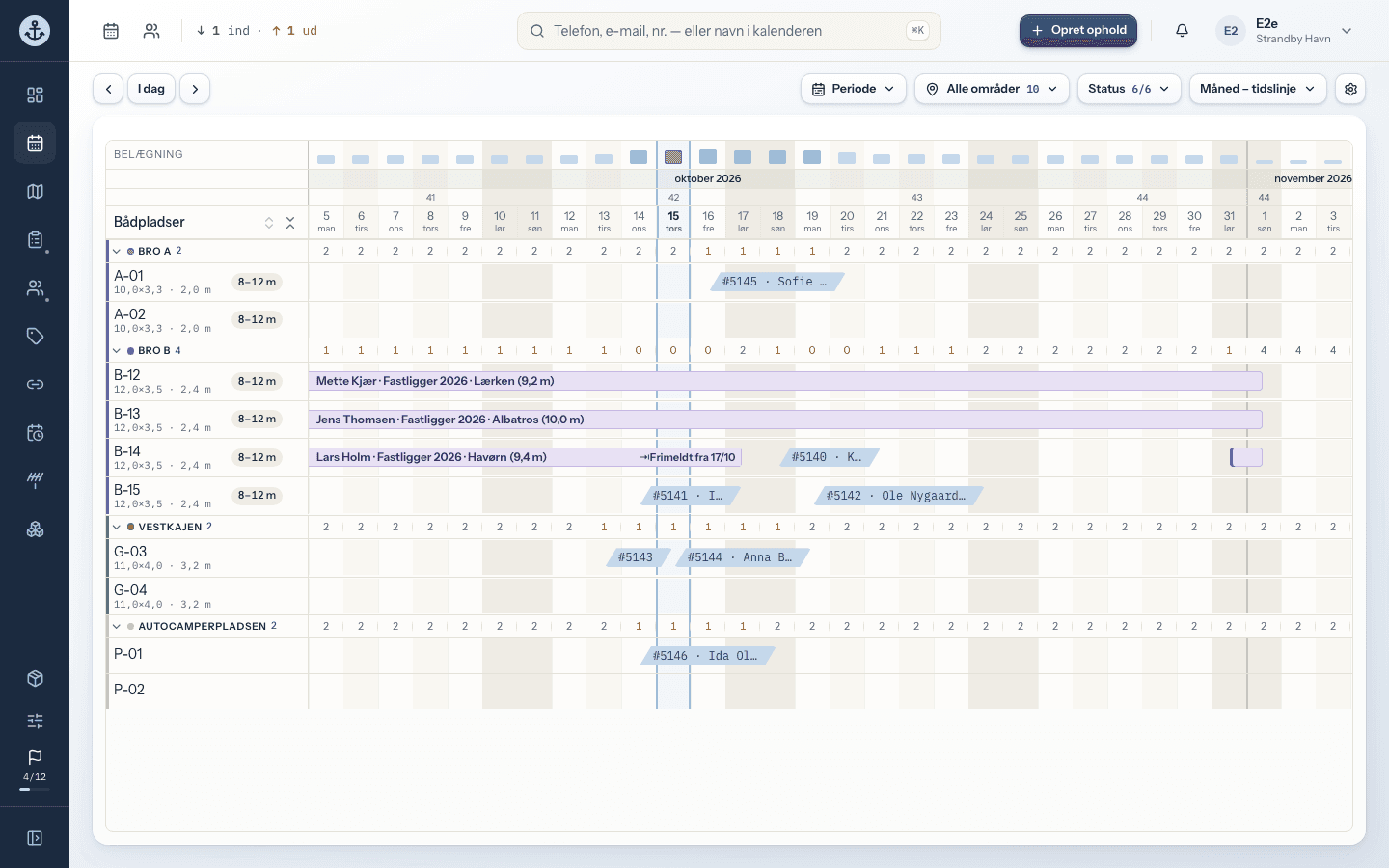
Screenshot from GoHavn: Calendar
How it works

A calendar built for berths

The calendar in GoHavn shows every berth in the harbour as a row, grouped jetty by jetty. Under each berth are its sizes – length, width and depth – so you can see straight away which boat can moor where.

Berth holders appear as one long bar across the season, and visiting sailors have their own colour. When a berth holder is released, a gap appears in the bar, and visiting sailors can book the gap. Blocked periods are clearly marked, so nobody books a berth that can’t be used.

More in Calendar

Jetty by jetty, with sizes on every berth

Each jetty is its own section in the calendar, and under every berth number are its sizes, e.g. 12.0 × 3.5 m and 2.4 m depth. Filter by jetty, type or status, so you only see what you need.

  • Jetties and zones as sections
  • Sizes under every berth
  • Filters for type, status and area

Drag and drop – even between jetties

If a sailor needs to move, drag the stay onto the new berth. The system asks you to confirm the move before it is saved. Drag across an empty row to create a new stay.

  • Move a stay with the mouse
  • Confirm before it is saved
  • Create a stay by dragging on an empty row

Released weeks become guest berths

When a berth holder is out sailing, the period shows as a gap in their bar. Drag a visiting sailor into the gap and the berth is booked – and the berth holder has it back when the boat comes home.

  • The berth holder’s season as one bar
  • A release shows as a gap
  • Guests are booked straight into the gap

Timeline, month and time slots

Switch between the timeline and the month view as you need. Anything booked in time slots – such as the crane or the slipway – has its own timeline in minutes.

  • Timeline and month
  • Timeline in minutes for the crane and slipway
  • Blocked periods marked

What you get

  • Every berth on one timeline
  • Jetties and zones as sections
  • Berth sizes in the calendar
  • Drag and drop with confirmation
  • Released periods can be booked by guests
  • Blocked periods marked
  • Filters for type, status and area
  • Time slots for the crane and slipway
Questions

Questions about Calendar

Can we see in the calendar whether a boat fits the berth?

Yes. Under each berth are its length, width and depth, and when you book, the system checks the boat’s sizes against the berth.

What happens in the calendar when a berth holder is released?

The period shows as a gap in the berth holder’s bar. Visiting sailors can book the gap, and when the period is over, the berth holder has their berth back.

Can we move a booking to another jetty?

Yes. Drag the stay onto the new berth – even on another jetty – and confirm the move.